How to scrape a list from multiple pages into Excel or CSV without code
Search results, store categories, job boards and directories usually show 20 or 30 items per page with a Next link at the bottom. Copying page by page is slow and easy to get wrong. Here is what works without writing code.
What Excel and Google Sheets can do on their own
- Google Sheets IMPORTHTML reads one HTML table or list from one address. For several pages you need one formula per page, and it only works when the page address changes in a predictable way (for example
?page=2) and the data is a real HTML table or list. - Excel Data, then From Web (Power Query) can load tables from a web address. Combining many pages means editing the query, which is doable but fiddly.
- Neither one sees lists built from cards (product tiles, job cards, directory entries), and neither can click a Next button that loads results without changing the address.
Collect all pages with a browser add-on
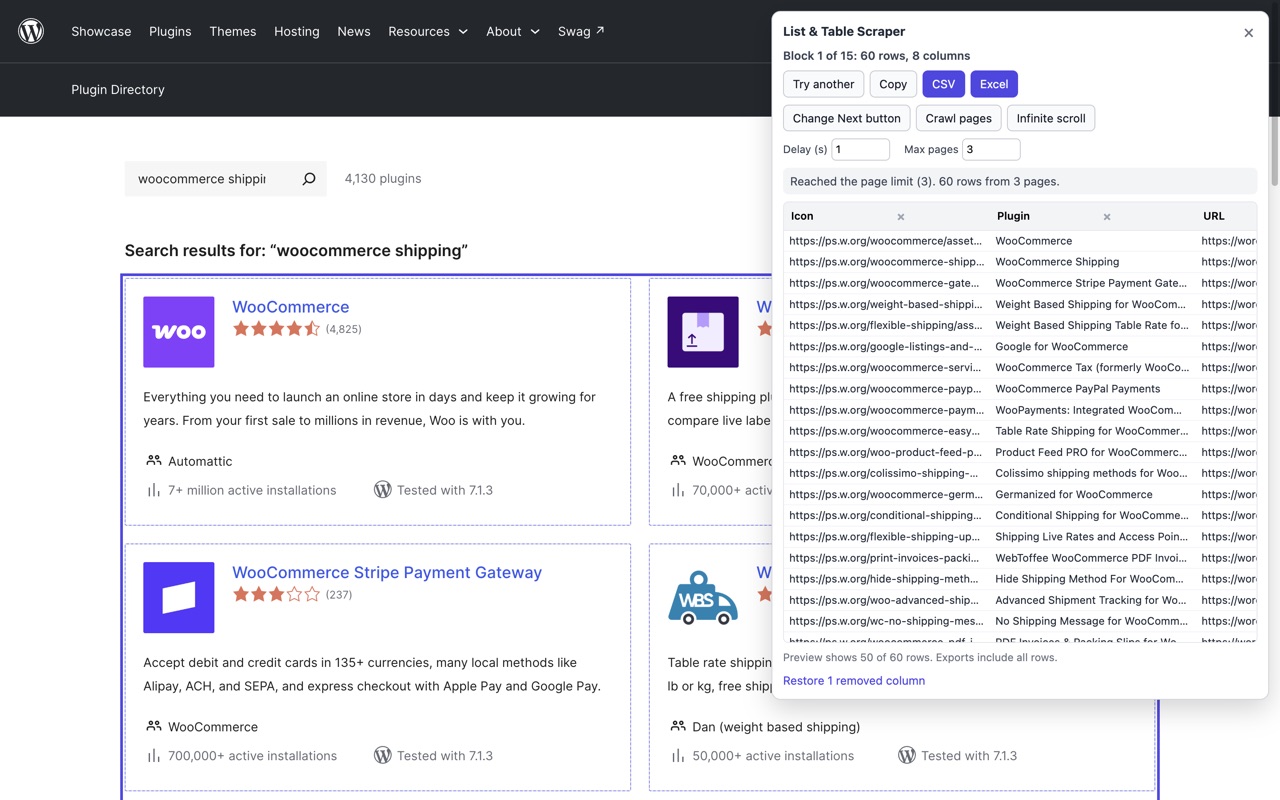
List & Table Scraper is a Firefox add-on we make. It is free for up to 3 pages per run, and it works on the page as you see it, so it handles card layouts and Next buttons too.
- Open the first page of results and click the add-on's toolbar button. It outlines the block of repeated items and shows a preview. If it picked the wrong block, click Try another.
- Click Locate Next button, then click the site's own Next link or button.
- Set Max pages and the Delay between pages (1 to 10 seconds), then click Crawl pages. The free version reads up to 3 pages per run. With Pro Max pages goes up to 500.
- It collects page after page until there is no Next, or until the page limit, and drops duplicate rows. If a free run stops at 3 pages, the panel says so and you can still export what it collected.
- Download CSV, Excel (.xlsx) or JSON, or copy and paste into Google Sheets.
When Next is a normal link, the next pages are loaded in the background from the same site, so the page you are on stays where it is. When Next is a button that updates the page in place, the add-on clicks it and waits for the new rows. For pages that load more items as you scroll, use Infinite scroll instead.
Limits worth knowing
- It reads what the page has loaded. If a site builds its list with JavaScript after a link-based Next, the background load may not find the list, and the panel tells you when that happens.
- Free reads up to 3 pages per run. Pro (from USD 4 a month) reads up to 500 and saves a recipe per website, so the block and the Next button are remembered next time. CSV, Excel and JSON export are free either way.
- Use a delay of a few seconds and a sensible page limit so you do not hammer the site, and respect each website's terms of use.